
Guide
Query fan-out: how AI search turns one question into many
Last updated Prices checked
What people find when they search this term
The US results for "query fan out" are mostly explainers from SEO software companies and search-industry publications, a glossary entry or two, and coverage of what Google has said about the technique in AI Mode. Most of them define the term and list ways to "optimize for subqueries."
This page covers the definition briefly, then the two practical questions: what it changes about which pages get cited, and how you can tell whether your content is being picked up.
What query fan-out is
A classic search engine takes your query and returns a ranked list for that query. An AI answer engine often does more work before it replies:
- It reads the question and works out what the person actually needs, including parts they didn't say out loud.
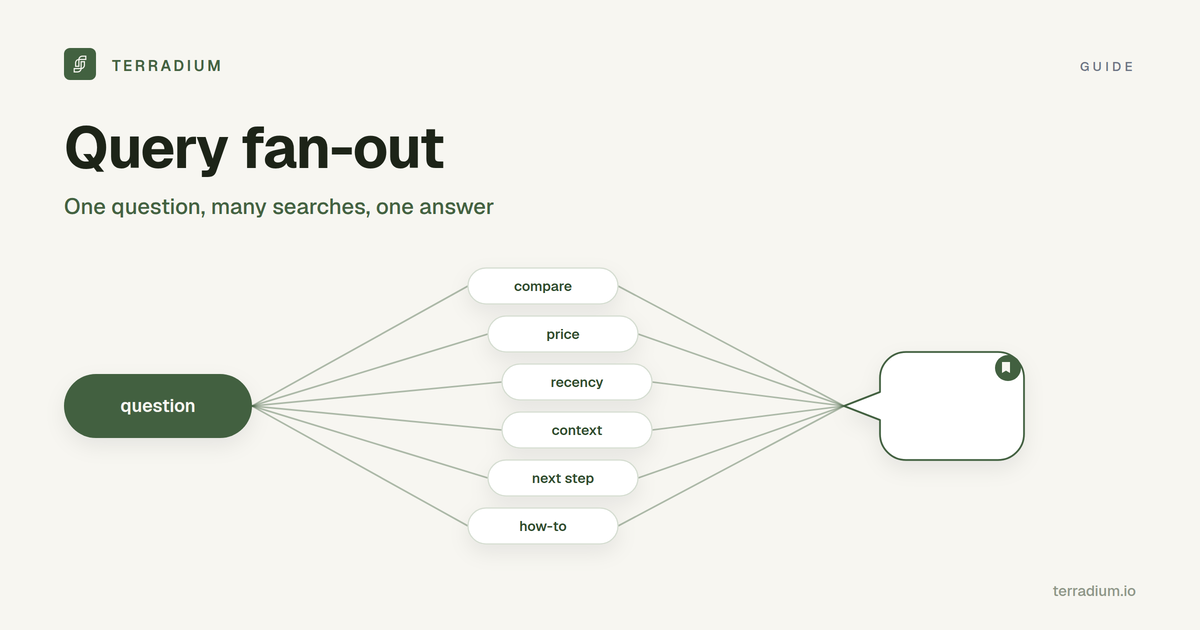
- It splits the question into sub-searches. One prompt becomes several narrower searches, each aimed at one part of the answer.
- It retrieves passages for each sub-search from the pages it can reach.
- It writes one answer from the best passages and cites some of the pages it used.
"Fan-out" is step 2: one query fanning out into many. The sub-searches are generated by the model, not typed by the user, and they can change from one run to the next.
Why it changes which pages get cited
Because the engine searches for the parts of a question, not only the whole of it, a few things follow:
- A page can be cited for a question it never targets. If your page answers one sub-question clearly, it can be pulled into the answer even though it doesn't match the original prompt.
- One keyword per page is a narrow bet. A page written around a single phrase covers one branch. Pages that also answer the obvious follow-ups have more branches to be found on.
- Passages matter more than pages. The engine uses short passages, so a clear, self-contained answer near the top of a section is easier to use than one buried in a long paragraph. (More on how engines pick sources in AI answer engines.)
- Answers vary run to run. Different runs can fan out differently and cite different pages, which is one reason a single screenshot proves little. See does ChatGPT give the same answers to everyone?
The kinds of sub-questions a fan-out tends to cover
You can't see the exact sub-searches, but you can predict the kinds of questions a buyer's prompt implies. Take a prompt like "best invoicing tool for a small agency":
| Kind of sub-question | What it asks | Example |
|---|---|---|
| Rephrasing | The same need in other words | "invoicing software for small agencies" |
| Implied need | Requirements the user didn't state | "invoicing tool with recurring billing" |
| Comparison | Options against each other | "tool A vs tool B for agencies" |
| Recency | The current state of things | "invoicing tools 2026" |
| Context | The user's situation | "invoicing for a 5-person agency" |
| Next step | What they'll need after the answer | "how to switch invoicing tools" |
If your content only answers the first row, you are competing for one branch out of six.
Can you see the fan-out queries?
Not reliably. The sub-searches are generated inside the engine and are usually not shown to the user in full. Some interfaces show some of the searches they ran, but they differ by engine and by run, and there is no complete public log of them.
So treat fan-out as a planning model, not a list to copy. Use it to decide which questions a page should answer, then measure the outcome: whether the engines cite you for the buyer questions you care about.
How to write for query fan-out
- Start from the buyer's real questions. Write down the questions customers ask before they buy, in their words. Search Console queries and sales calls are good sources.
- Map the sub-questions for each one. Use the table above: rephrasings, implied needs, comparisons, recency, context, and next steps.
- Answer each sub-question in its own section, with the answer in the first sentence or two. A heading that matches the sub-question helps the engine find the passage.
- Add the formats the sub-questions call for. A "best X" question wants a list, "X vs Y" wants a real comparison table, "how do I" wants ordered steps.
- Link related pages to each other so a cluster covers the topic, rather than one page trying to cover everything.
- Make sure the engines can read the page. Most AI crawlers don't run JavaScript, and a robots.txt rule can block a search crawler. The free AI crawler checker checks robots.txt rules for AI crawlers, llms.txt, and server rendering for one URL.
How to measure whether it's working
Since the sub-searches are hidden and change between runs, measure the outcome instead: ask the engines the buyer questions you care about on a schedule, and record what they say.
- Appearance rate: how often your brand shows up for a question.
- Citation share: how often your site is the cited source.
- Share of voice: how often you are cited compared with competitors.
These are sampled, directional numbers. They show whether new content is moving things; they are not a count of every conversation. Questions where a competitor is cited and you are not are your next pages to write.
Where Terradium fits
Terradium writes content built to be cited and then tracks where answer engines pick you up. It does not show or track the fan-out sub-queries themselves; it measures the result on the questions you choose.
- Keyword research and topics: confirm seed keywords, Terradium clusters the results, and you turn the clusters into topics and the questions buyers ask an assistant.
- AI Visibility: 15 tracked questions, sampled weekly, on 3 answer engines of your choice (ChatGPT, Perplexity, Google AI Overviews, or Gemini), with appearance rate, citation share, and share of voice.
- Actions: prompts ranked by weakness (never appear, appear but not cited, cited low), with the engines that didn't cite you and which tracked competitor URLs were cited. Each action suggests a format: a listicle for "best X", a comparison for "X vs Y", a how-to for "how do I".
- 30 answer-ready article generations per billing period, published to a built-in CMS or a signed webhook, with GEO Readiness checks on the live page.
- $29/month, 7 days free, then billed monthly. Cancel anytime. See pricing.
Want a quick look first? The free AI visibility checker asks ChatGPT and Google AI Overviews one question and shows whether each answer mentions your brand and cites your domain. To compare trackers, see AEO tracker and the best AI visibility tools.
FAQ
- What is query fan-out?
- The technique where an AI search system splits one question into several related sub-searches, retrieves results for each, and combines them into one answer.
- Where does Google use query fan-out?
- Google uses the term to describe how AI Mode handles complex questions. Other answer engines that search the web can also run more than one search per prompt.
- Can I see which fan-out queries an AI engine ran?
- Not reliably. The sub-searches are generated inside the engine, are usually not shown in full, and can change between runs.
- How do I optimize content for query fan-out?
- Answer the buyer's question and its likely sub-questions (rephrasings, implied needs, comparisons, recency, context, next steps), each in its own clearly headed section, and make sure AI crawlers can read the page.
- Does Terradium track fan-out queries?
- No. Terradium tracks the outcome: how often answer engines mention and cite you for the questions you choose, sampled weekly on 3 engines.
- Is query fan-out the same as keyword research?
- No. Keyword research looks at what people type into search. Fan-out is what the engine searches for on the user's behalf. Keyword research is still a good way to find the buyer questions to start from.
Start the 7-day free trial
Start the 7-day free trial · Check one question free
See where AI answers leave you out
Terradium samples ChatGPT, Perplexity, Google AI Overviews and Gemini for the questions your buyers ask, then writes the articles that close the gaps. $29 a month, 7 days free.
Start free for 7 days